New · Gary AI Assistant is now live

The sales workspace that actually moves deals.

SalesFlo brings tasks, accounts, AI guidance, and pipeline signals into one daily command center—so reps spend less time guessing what to do next and more time closing.

30-second Gmail connect No separate to-do list Built for coaching, not bureaucracy
app.salesflo.io/command-center
SalesFlo Command Center dashboard
1
daily command center replaces 5 tool tabs
8x
faster follow-up on hot accounts
0
spreadsheets needed to manage the team
30s
to plug in Gmail and start working
01

Start Every Day Knowing What Matters

The Command Center is the daily cockpit every rep opens first.

01 — Command Center

SalesFlo brings tasks, account activity, orders, AI guidance, and key performance signals into one daily command center—giving every rep a clear starting point without another dashboard to decipher.

  • AI daily brief surfaces overdue tasks, open tasks, and active accounts in 30 seconds
  • Gary's Take delivers manager-level coaching on what to push today
  • Live activity stream shows every outbound call, order, and signal that happened yesterday
  • Big-number performance strip (Revenue MTD, Orders MTD, Calls Today, Emails Today) keeps the pulse on
SalesFlo Command Center

02 — Action Queue

Turn Priorities Into Action

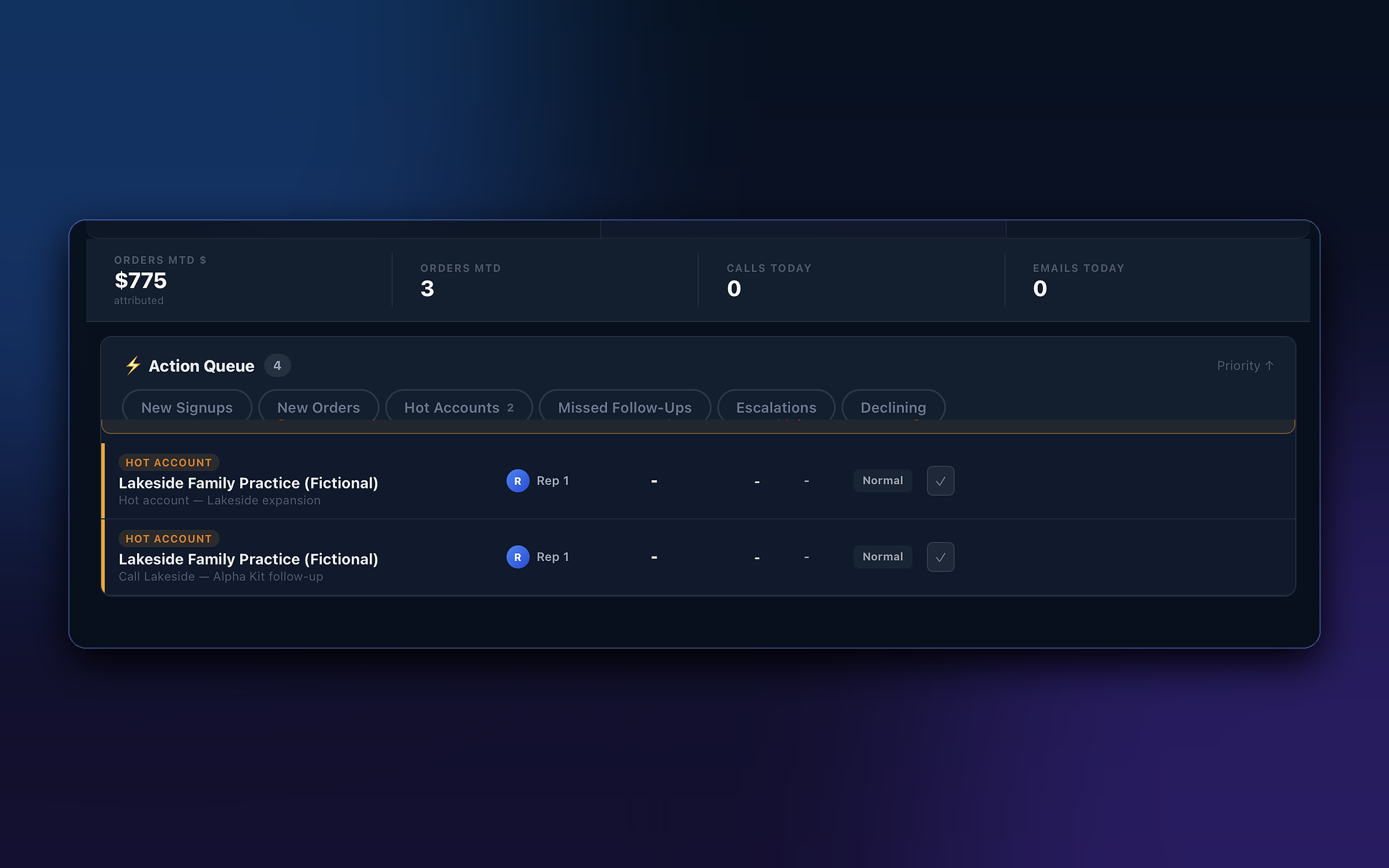
The Action Queue surfaces the accounts and follow-ups that need attention now—from new signups and orders to hot accounts, missed follow-ups, and escalations—so reps spend less time deciding what to do next.

  • Filter by New Signups, New Orders, Hot Accounts, Missed Follow-Ups, Escalations, or Declining
  • "My Queue Only" toggles to show just the rep's work, not the team's
  • Each item shows the rep, stage, priority, and last touchpoint at a glance
  • One-click resolution so closing a follow-up takes seconds, not minutes
PRIORITYSalesFlo Action Queue

03 — Tasks

Follow Up Without the Busywork

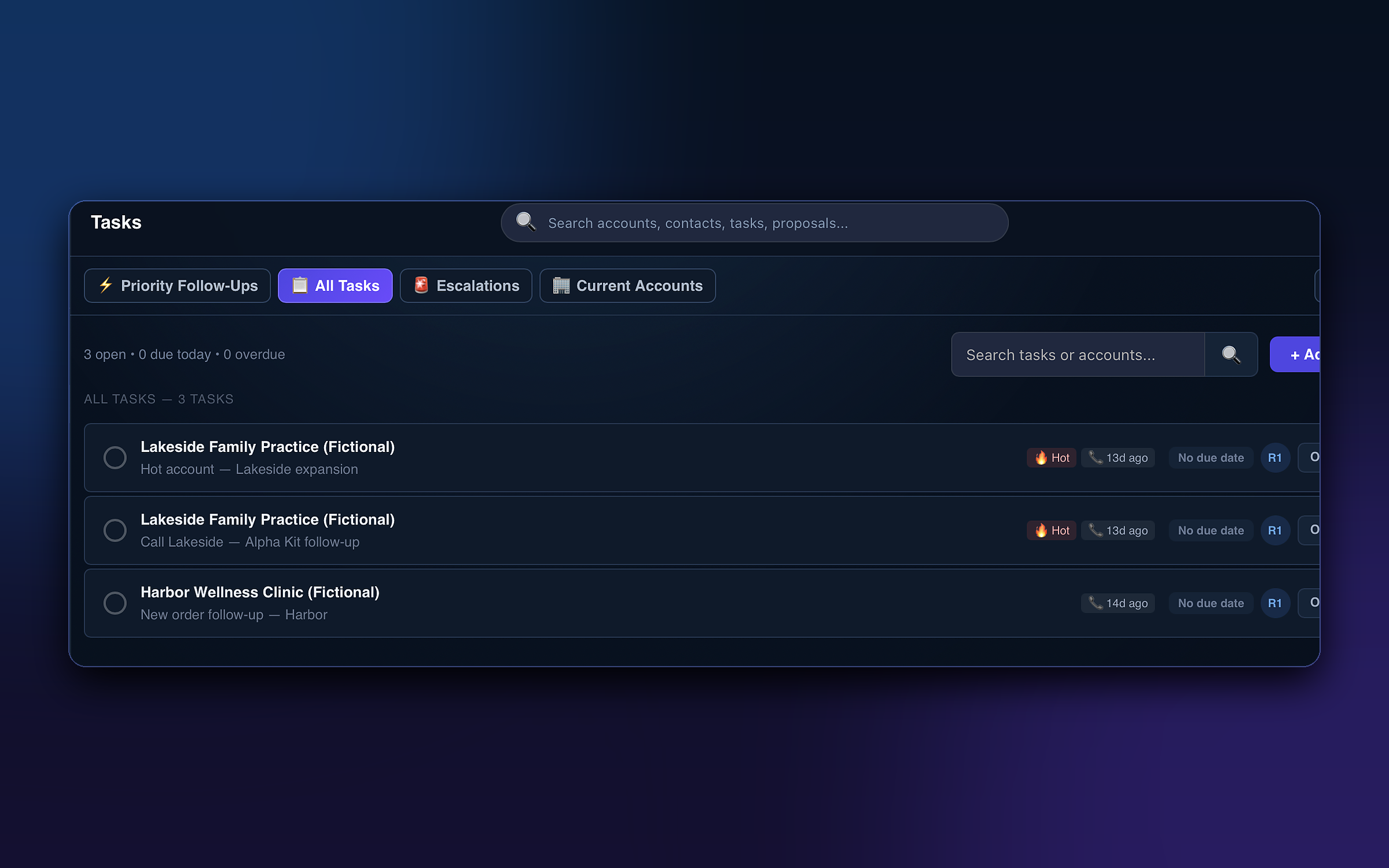
Keep every follow-up organized with priority views, escalations, account context, activity signals, and status tracking. SalesFlo helps reps stay on top of their work without maintaining a separate to-do system.

  • Priority Follow-Ups, All Tasks, Escalations, and Current Accounts tabs inside one view
  • Each task inline-displays the account, age, hot/regular signal, and assigned rep
  • Built-in search and filtering replace the sticky-note and spreadsheet habit
  • Tasks auto-attach to the account story so context is never lost
SalesFlo Tasks view

04 — Accounts & Leads

Customer baskets built around your sales framework

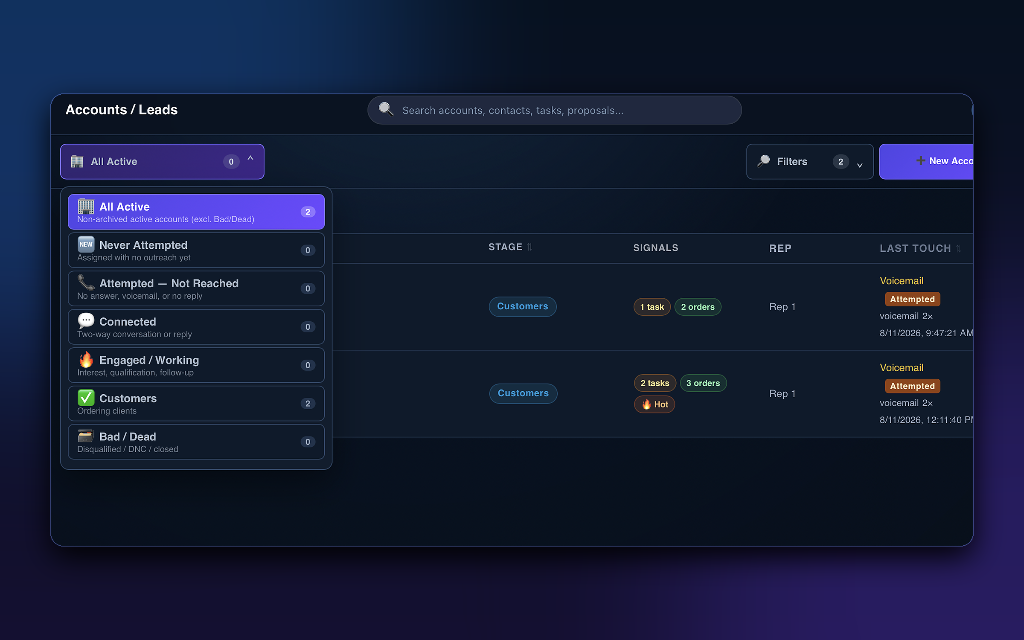
Group every account into a stage-based basket — All Active, Never Attempted, Attempted, Connected, Engaged, Customers, or Bad/Dead — so reps open one screen and see exactly which work belongs in which bucket of the sales framework. Tasks, orders, rep ownership, and last-touch recency live on the same row.

  • Seven sales-framework baskets: All Active → Never Attempted → Attempted → Connected → Engaged / Working → Customers → Bad / Dead
  • Signals column shows task count (yellow), order count (green), and 🔥 Hot badges inline per row
  • Rep + Last Touch columns surface voicemail, attempt outcome, and timestamp so ownership and recency are obvious
  • Filters + '+ New Account' keep pipeline mechanics one click away from the list
SalesFlo Accounts and Leads pipeline

05 — Account Workspace & Gary's Take

The account page, powered by Gary — AI-driven quick actions before engagement

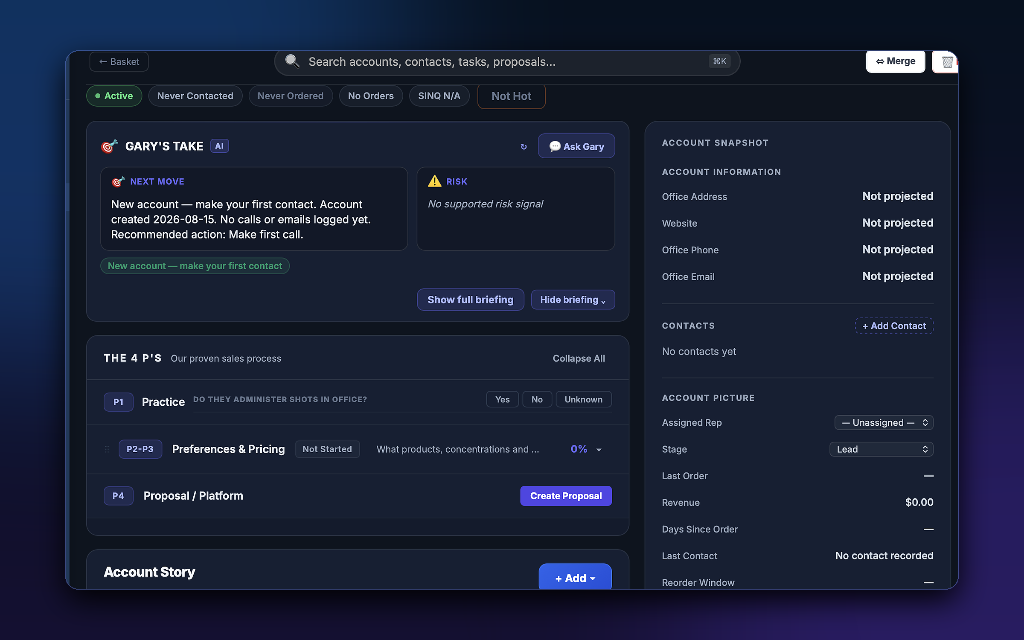
Open any account and Gary reads the signals first — surfacing the next move, flagging missing info as a risk, and guiding the rep through the Four P's sales process before the first call. Filter chips on top, Account Snapshot on the side, and Account Story underneath mean pre-engagement prep lives on one screen.

  • Filter chips at the top — Active, Never Contacted, Never Ordered, No Orders, SINQ N/A, Not Hot — segment the workspace the rep is prepping
  • Gary's Take panel: a Next Move card with recommended action, a Risk flag for missing info, plus Ask Gary for fast coaching
  • The 4 P's checklist (P1 Practice → P2-P3 Preferences & Pricing → P4 Proposal / Platform) gates progress before engagement
  • Account Snapshot sidebar shows Office Address, Contacts, Assigned Rep, Stage, Last Order, Revenue, and Reorder Window in one card
GARY'S TAKESalesFlo Account Workspace with Gary's Take
06

Gary — Your Embedded AI Sales Assistant

Customizable for every business use case

06 — Gary AI Assistant

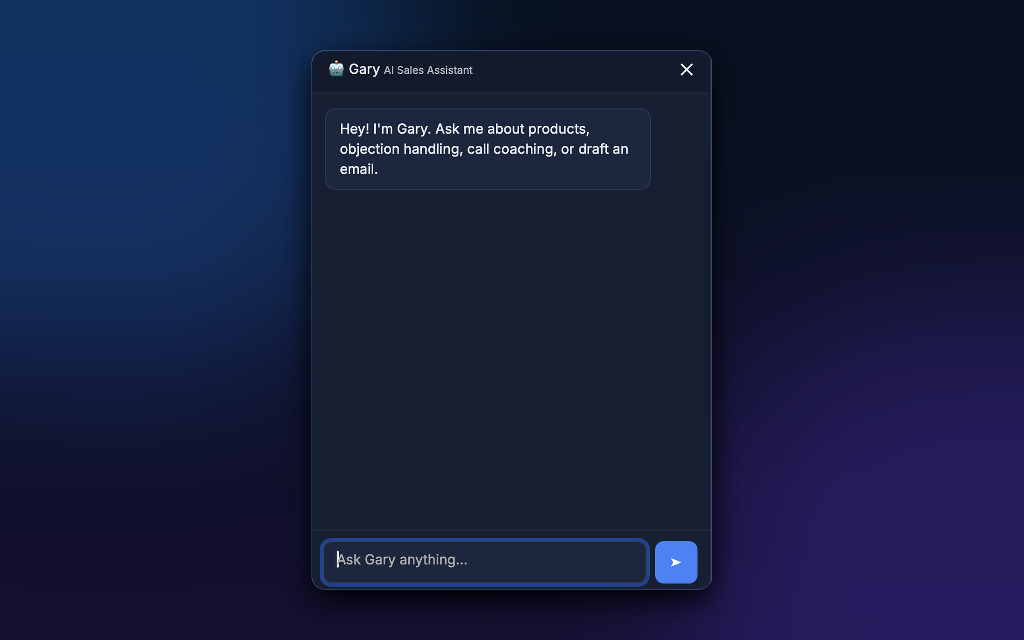
Ask Gary — products, objections, performance, workflow

Click Gary anywhere in SalesFlo and the chat panel slides open. The greeting in the panel says it all: “Ask me about products, objection handling, call coaching, or draft an email.” Because Gary is customizable per business, the prompts, knowledge, and tone adapt to the way your team sells.

  • Product questions — pull answers from your own catalog, dosage, spec, and policy knowledge base
  • Objection handling — get a tailored rebuttal for the exact resistance a prospect just raised
  • Call coaching — replay Gary’s framing guidance for discovery, demo, and close moves
  • Workflow & performance — draft an email, summarize a call, review weekly numbers, or run any custom workflow you enable
  • Customizable per business — prompts, scopes, and integrations are tuned to the way your team sells, not a one-size-fits-all bot
GARY AIGary AI Sales Assistant chat

07 — Account Story

Every touchpoint, in chronological order — one timeline per account

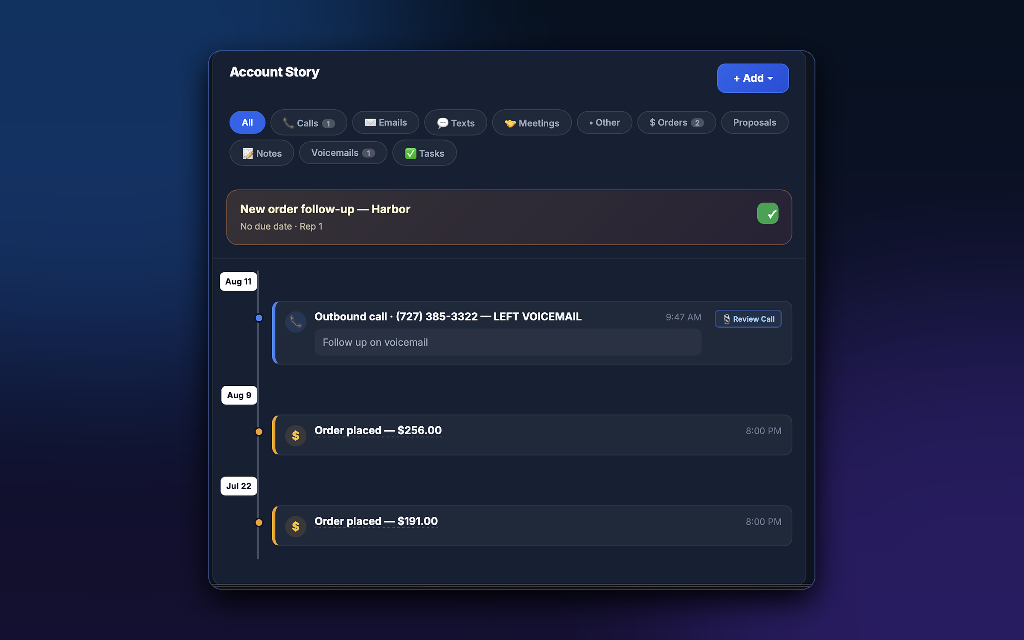
This replaces account story. Every interaction with the account — from first voicemail to most recent order — lives on a single chronological timeline, grouped by activity type and pinned with the most urgent follow-up so nothing slips through the cracks.

  • Filter chips at the top with live counts: Calls (1), Orders (2), Voicemails (1), plus Emails, Texts, Meetings, Other, Proposals, Notes, and Tasks
  • Pinned open-task banner shows New order follow-up — Harbor · No due date · Rep 1 with a green completion check, floating above the timeline until it’s done
  • Vertical timeline uses dated markers (Aug 11, Aug 9, Jul 22) so reps scroll the relationship by date, not by list order
  • Each entry shows the action, the outcome, and the exact time — Outbound call · (727) 385-3322 — LEFT VOICEMAIL 9:47 AM, Order placed — $256.00 8:00 PM, Order placed — $191.00 8:00 PM
  • “+ Add” button in the header lets a rep log a touchpoint in one click without leaving the page
SalesFlo Account Story timeline
08

Team Performance — Built for Sales Leaders

Goals, activity, and compliance on one screen

08 — Team Performance

Goals, activity, and compliance — on one screen

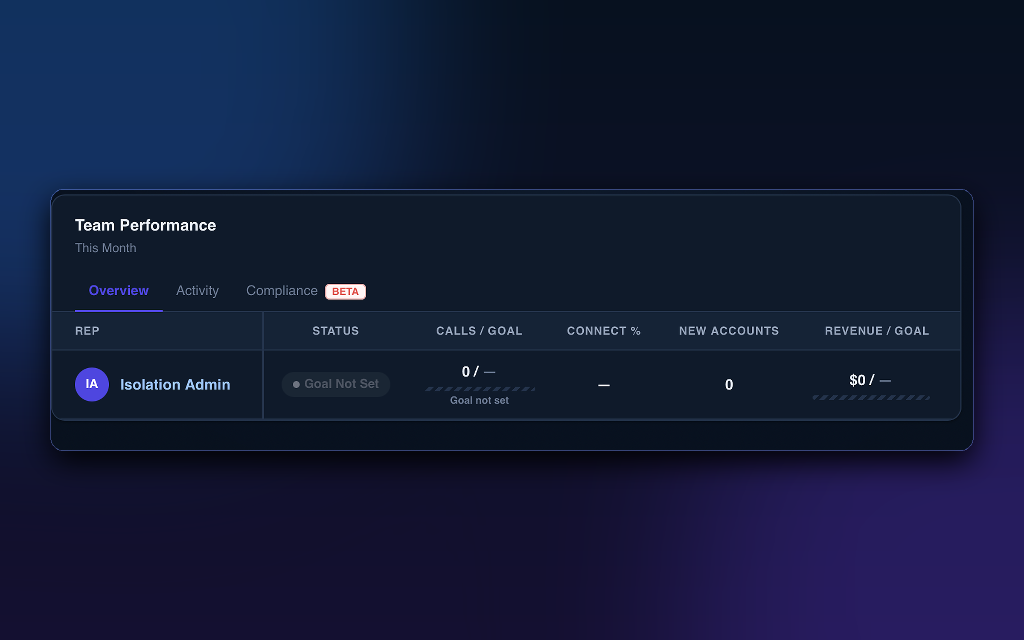
The Team Performance dashboard gives sales leaders live visibility into rep activity, goals, connection rates, new accounts, and revenue — no spreadsheets, no end-of-week scramble to assemble a report. The header sits on a This Month scope, with tabs to switch between views in a click.

  • Tabbed view: Overview (active by default), Activity, and Compliance (BETA) — all three views share the same rep table so leaders do not lose context
  • Per-rep columns: REP, STATUS, CALLS / GOAL, CONNECT %, NEW ACCOUNTS, REVENUE / GOAL
  • Goal Not Set status badge + hashed empty progress bars under CALLS / GOAL and REVENUE / GOAL — visual cues push leaders to formalize targets without nagging
  • Connect %, New Accounts, and revenue columns become clickable drilldowns for one-on-one prep and coaching
LEADER VIEWSalesFlo Team Performance dashboard
⚡ Founding-customer pricing during beta

Simple, transparent pricing. Billed monthly.

Per-seat pricing for every plan. Starter is flat for small teams, Growth and Enterprise scale per seat. Need a hand choosing? Book a demo and we'll scope the right plan for your team size and motion.

Starter
$200/ month
1–5 seats · billed per organization
Everything a small rep team needs to start working out of one command center.
  • Command Center & Action Queue
  • Tasks, Accounts & Leads pipeline
  • Account Workspace + Story timeline
  • Gmail connect (30-second setup)
  • Email & in-app support
Start with Starter
Enterprise
$150/ seat / month
21+ seats · billed monthly
For larger orgs that need governance, security review, and manager-level reporting.
  • Everything in Growth
  • Compliance reporting (Beta)
  • Manager coaching workflows
  • Custom roles & permissions
  • SSO / SOC 2 documentation
  • Dedicated success manager
Talk to sales

All plans billed monthly, per seat (Starter billed per organization). Want early-access pricing? Book a demo →

Stop guessing what to do next.

Plug SalesFlo into your Gmail in 30 seconds. Give every rep a daily command center, an action queue that prioritizes itself, and an AI assistant who knows their accounts.

No credit card · Cancel any time · 30-second Gmail connect